设置
设置
 快速交货
快速交货
所订产品一般在 3个工作日 内送达新加坡,具体时间取决于收货地点。
 免运费
免运费
订单金额满 S$60免运费发送至新加坡。 所有少于 S$60的订单将收取S$24的运费。
 国际贸易术语
UPS、FedEx 或 DHL 运费预付: CPT(交货时支付关税、海关费用和当地税款)
 支付类型
支付类型
针对合格机构和企业提供的信用帐户
电汇预付


 市场产品
市场产品
更多来自全授权合作伙伴的产品
下单后,从合作伙伴发货平均需要时间 1-3 天,也可能产生额外运费。可能另外收取运费。 实际发货时间请留意产品详情页、购物车和结账页面上的说明。
国际贸易结算方式:CPT(交货时支付关税、海关费用和适用 VAT/应付税金)
有关详情,请访问帮助和支持


For the budding Roboteer, learning how to add and control actuators is a key skill. In this guide, we are going to take a look at our servo driven Klaw actuator,* and show you how to control it via code.

We recently launched the Kitronik Simple Servo Control Board for BBC micro:bit, and Emma wasted no time in putting together three great resources for it. We've included all three resources below, with all of the files needed and step by step instructions for each.
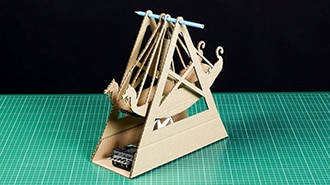
Follow along with Emma and learn how to make your own. We've kept ours plain but it's the perfect platform for a spot of decoration. Let's get making...

Emma guides you through how she made each of the following projects, and we've provided you with all of the necessary DXFs, PDFs, Illustrator Files, and HEX files. Read on to find out more.
谢谢!
敬请关注收件箱中的 DigiKey 新闻与更新!
请输入电子邮件地址
请勾选该复选框