






 Settings
 Fast Delivery
 Free Shipping
 Incoterms
 Payment Types


 Marketplace Product

Use Gestures to Control Any System
Contributed By DigiKey's European Editors
2017-07-05
Tablets and smartphones have helped popularize the idea of using gestures to control electronic devices. Movements such as pinching fingers together are now synonymous with making an onscreen object smaller; a swipe using more than one finger slides from one picture or app to another. These simple movements now seem entirely familiar.
Thanks to their everyday use, gestural interfaces are beginning to move into other areas of technology. They are seen as important to automotive applications where the driver needs to control functions without taking attention away from the road. Often, such gestural interfaces are used as adjuncts to dashboard interactive displays. However, a key advantage of a gestural interface is that it does not require a complex visual display. Audible messages or changes in light configuration on a device can signal that a gesture has been recognized and that the status has changed. As a result, gestural interfaces will be highly useful in devices that provide ambient intelligence as part of the Internet of Things (IoT).
The gestures for devices without a graphical interface will be simpler than those found on smartphones, which often respond to changes in the number of fingers used. These simpler interfaces will typically be based on whole hand movements. An upward sweeping gesture in front of a sensor panel may tell the control systems inside the room to turn up the lights. A horizontal sweep may signal the heating controls to turn the temperature up or down. A quick flick of a finger may advance to a different function, or tell the entertainment system to advance to the next track.
The meaning of the gesture can then change depending on which mode the sensor panel is in, with perhaps simple LED annunciator icons or voice messages telling the user which mode is active. Through a network connection to the various systems inside the room, the sensor panel can control many functions, one of the advantages of an IoT infrastructure. The sensor panels may be integrated into tables, wall controls or other electronic devices such as audio speakers. Multiple devices can potentially coordinate with the IoT systems to provide convenient control at different places inside the room.
There are a number of ways to detect gestural movements, including cameras and proximity sensors. However, cost is an issue in IoT applications. Camera based solutions demand complex software to process the images, but offer high flexibility and the ability to recognize many different types of gestures.
The electric field sensor provides much lower cost and simpler operation. The sensor uses electrodes driven by AC to project an electric field above the surface of an object. The frequency is chosen to reduce the magnetic component of the electromagnet to a minimum, and develops a quasi-static electrical near field that is disturbed by a conductive object, such as a hand, moving into range.
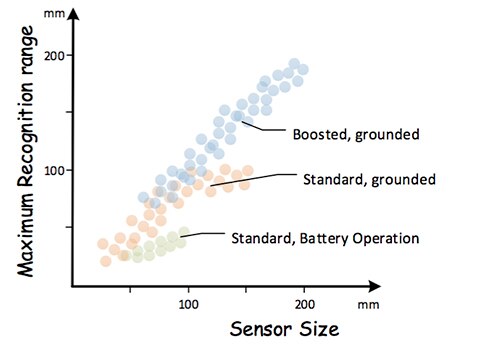
Figure 1: The ranges available with standard and boosted sensor types.
With the user’s hand in the sensing volume, the field lines that pass into it are shunted to ground through the user’s body, which distorts the overall field. The effect reduces the electrode signal levels close to the hand to lower levels, which are detected by an array of sensors. As the hand moves around, different parts of the array pick up the motion and communicate the changes in potential to a controller IC, such as Microchip Technology’s MGC3x30 GestIC.
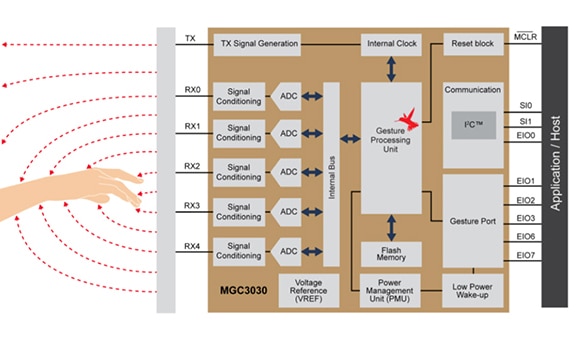
Figure 2: Block diagram of the GestIC MGC3030.
The GestIC has interfaces for up to five receive electrodes and a single transmitter. The receive and transmit electrodes can be made of any conductive material, such as copper mesh or indium tin oxide (ITO). The isolation between the electrodes can be any material that is non-conductive, including PCB FR4, glass or plastic. An optional cover layer on top of the electrode must be non-conductive as well. The transmit electrode is placed underneath the array of receive electronics.
The design provides a choice between standard and boosted sensors. Standard is suitable for small, often battery powered devices that have a weak connection to earth ground. Using a higher transmit voltage, the boosted sensor type is suitable for larger devices that have a ground connection, including those that need a larger recognition range. Using a standard sensor configuration, a grounded connection offers a larger recognition range, generally up to 100 mm versus 50 mm for a battery operated non-ground device. The sensor shape can be approximately square or circular with an aspect ratio not exceeding 1:3.
The GestIC hardware recognizes the electrical center of mass of the human hand, and can track that point as it moves within the range of the sensor. The XY position of the user’s hand is picked up by four of the sensor electrodes. The fifth connection can be used as a button or a center electrode to recognize a simple “button touch” gesture.
To ease integration into the system, the GestIC device contains its own gesture processing firmware that is stored in internal flash. This firmware includes the Colibri Suite of digital signal processing (DSP) algorithms based on hidden Markov models that perform functions such as approach detection, position tracking and gesture recognition. There are also functions for transferring status updates to a host microcontroller (MCU) using a message-based interface as well as functions for handling firmware updates.
Communication between the MCU and the MGC3X30 is achieved using an I2C compatible two-wire serial interface. This lets the MCU read the sensor data and send control messages to the chip. An address pin is available for selecting between up to two MGC3X30 devices on the same bus. The GestIC firmware updates sensor readings at a default rate of 5 ms, updating the serial port message buffer each time and pulling a transfer status (TS) line low to indicate a new reading is available.
A number of runtime parameters can be set by the host, including the types of gesture that the GestIC device is expected to detect. The command 0xA2 for Set_Runtime_Parameter employs a bitmask to filter out unwanted gesture types. Disabling gestures can help improve the recognition probability of the others, which improves the usability of simple control interfaces. Gestures that can be recognized by the GestIC are flick gestures along the Cartesian axes, and circling gestures in either a clockwise or counterclockwise direction.
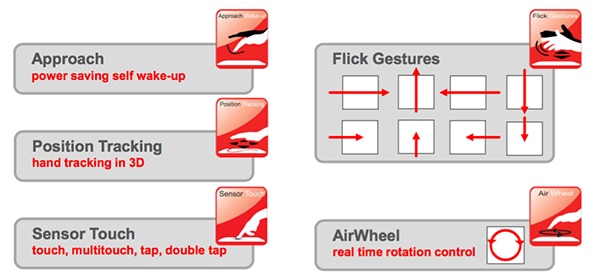
Figure 3: Types of gesture recognized by the GestIC solution and potential uses.
The GestIC firmware further provides position updates for the hand as it moves within the field of the sensor, and are output alongside gesture updates. Further information includes touch events assisted by the inclusion of the fifth electrode and the AirWheel data. The AirWheel works in a similar fashion to the scroll wheel found on older portable music players, but with the gesture performed above the surface of the device.
To make it easier for the engineers developing software for the host MCU, Microchip has developed a C-based API that is supported by reference code. The API handles functions to manipulate the message buffer, decode message bitmasks into C structures, and perform event handling. These functions decouple the host MCU from the low-level protocol and its timing constraints. To support design, a second software package, Aurea, runs on a Windows based PC. The software interprets the messages sent by the GestIC and provides a visual representation of the gestures and position data. Using Aurea, developers can optimize sensing parameters and layouts to best support the target application. A development kit provides an I2C USB bridge to provide prototyping support for sensor and software development.
Conclusion
Thanks to its combination of low-cost hardware based on electric-field sensing and a support infrastructure of software tools and firmware, the MGC3x30 GestIC provides an effective solution for building intuitive interfaces into a wide range of IoT-capable devices.

Disclaimer: The opinions, beliefs, and viewpoints expressed by the various authors and/or forum participants on this website do not necessarily reflect the opinions, beliefs, and viewpoints of DigiKey or official policies of DigiKey.








 Singapore